
On some PCs, Windows 11 has been incorrectly warning that Microsoft Defender is turned off, even when it isn’t, for almost two months, but this week’s security update is finally fixing it. While the reports first showed up in early August, it wasn’t until the last day of the month that Microsoft acknowledged the issue, and today, I can confirm it’s fully patched.
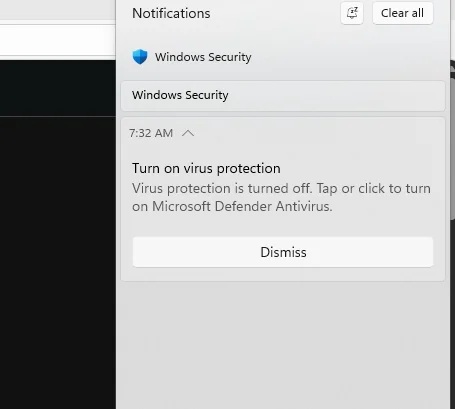
This was an unusual bug where the Windows Security app would frequently send an alert that Defender is turned off and urge you to turn it back on for protection against threats. Most users do not ignore these alerts, rightly so, and open the Windows Security app, only to find out that nothing is actually turned off.
According to Microsoft, Windows Defender’s false security alert affected all versions of Windows 11, Windows Server, and even Windows 10.
In our tests, Windows Latest found that it was a bug, and turning Defender off and back on did not make any difference. After reaching out to Microsoft, we found that the issue was tied to a bug with a recent Defender security update, and the company later issued a statement confirming the reports.
“After installing the latest updates for Microsoft Defender Antivirus, notifications might appear stating that ‘Microsoft Defender Antivirus is turned off,’ even though the antivirus is functioning correctly and all settings show it as active,” Microsoft noted in a statement, but the company never shared which specific update caused the issue.
Also, Defender updates are released every day, so you can’t simply find a particular KB, remove it, and expect Defender to get back to its senses. It doesn’t work like regular Windows updates.
I’ve clicked on these false alerts myself out of curiosity to see if malware had somehow disabled my antivirus protection, and I was redirected to the home tab of Windows Security. It doesn’t tell you anything alarming because everything is turned on, and your PC is being protected, with the time of the last scan also shown.
Of course, Windows Security nudges you to turn on OneDrive sync, but that’s a different story, and it’s here to stay for obvious reasons.
Although there’s an option to dismiss the “Turn on virus protection” alert, it’s of no use, as the warning would reappear, and you can’t even turn off the notifications. Windows Security alerts ignore most notification-related settings for good reasons, but in this case, it only made everything more annoying.
“These notifications can appear when Windows starts and intermittently afterward. They persist even if notification settings are turned off,” Microsoft noted.
Microsoft confirms it fixed Windows Defender false errors, explains what you need to do
In an updated support document, Microsoft confirmed that you don’t have to manually take any action, as the fix should reach all PCs automatically unless you’ve blocked mandatory security updates using Registry Editor or Group Policy.
“This issue was resolved in the Microsoft Defender Antivirus update (version 4.18.26080.4), released on September 17, 2026,” Microsoft noted.
I can confirm that Defender has finally stopped showing these false alerts, but in case you’re unsure, you should always verify whether Defender is actually running. To do that, open Windows Security and look at the current status. If it says active and shows the last threat scan time, you’re good to go.
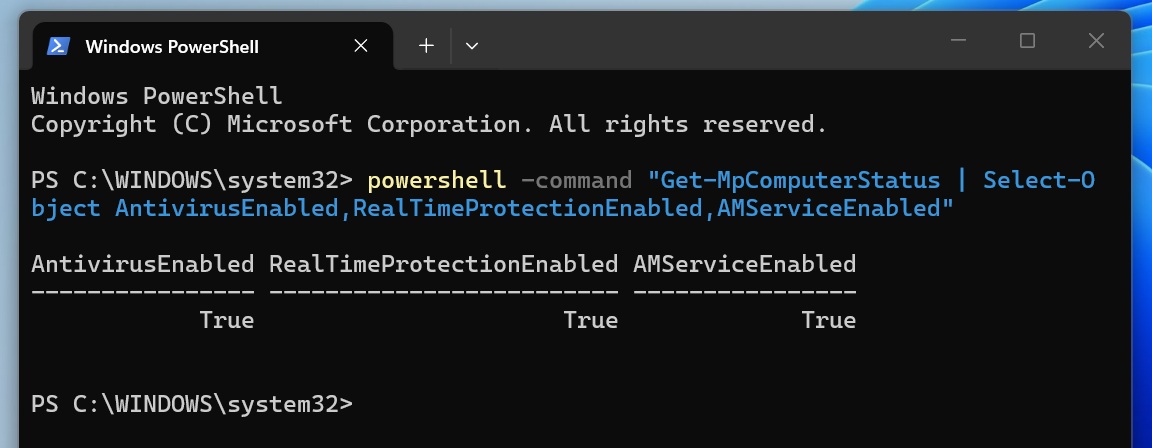
Or you can run the following command in PowerShell to generate a security status report:
powershell -command "Get-MpComputerStatus | Select-Object AntivirusEnabled,RealTimeProtectionEnabled,AMServiceEnabled"
The command should return three values as True, confirming that Windows Defender-related features, including real-time protection, are working:
AntivirusEnabled           : True
RealTimeProtectionEnabled  : True
AMServiceEnabled           : True
Microsoft has a lot to explain about why it took so long, as the problems date back to the first week of August.
In addition to the Defender woes, Microsoft is dealing with multiple issues on Windows 11, including audio problems and errors on AMD PCs.
The post Windows 11’s Defender kept falsely saying your antivirus was off, and Microsoft just fixed it appeared first on Windows Latest