
Windows 11 26H2 is rolling out now, and you don’t have to wait for it to show up on your computer. In our tests, Windows Latest found that this year’s feature update appears almost immediately on all PCs. However, if you haven’t seen it yet, check for updates or make sure your Windows clock is in sync.
Windows 11 26H2, also known as Windows 11 2026 Update, is another small enablement package, so the upgrade can take just a few minutes and a single restart if your PC is already up to date.
But if you’ve been following our coverage, you probably know that 26H2 isn’t a major platform release. Windows 11 26H2 shares the same underlying core as 24H2 and 25H2, and most of the features Microsoft is talking about have already been delivered through monthly updates.
Earlier today, I reported that Windows 11 26H2’s installation files were already live, pointing to an imminent release. Microsoft has now confirmed the public rollout on September 29, 2026.
How to download and install Windows 11 26H2
Microsoft is starting with eligible, unmanaged PCs where you’ve opted in to get the latest updates. To check for Windows 11 26H2:
- Open Settings > Windows Update.
- Turn on Get the latest updates as soon as they’re available.
- Click Check for updates.
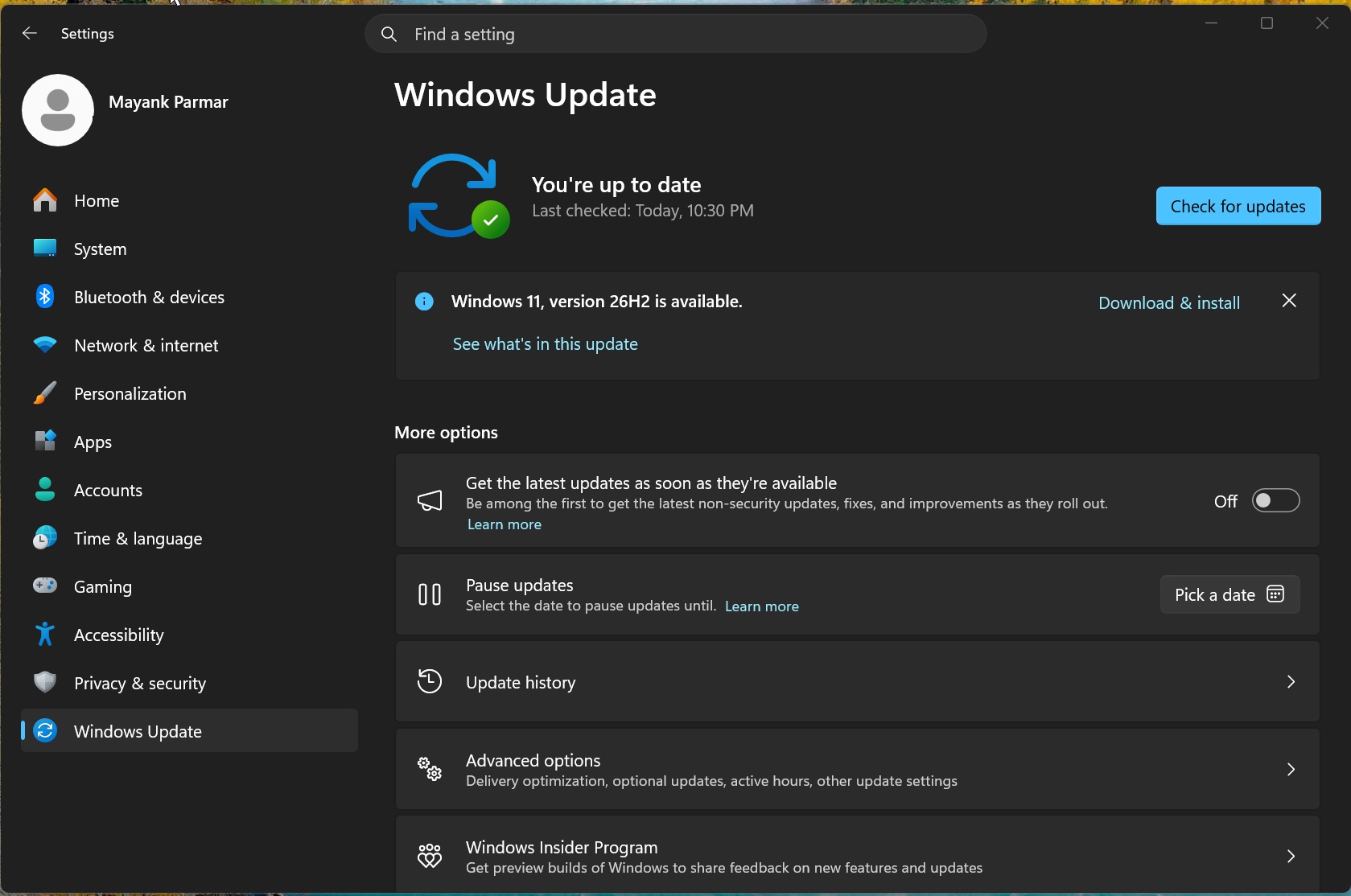
- Select Download and install when Windows 11, version 26H2 appears.
- Restart your PC when prompted to finish installing the update.
Once installation finishes, you can confirm the version from Settings > System > About, under Windows specifications. If it says 26H2, you’re on the new release, even if everything looks the same.
If it doesn’t show up, that doesn’t automatically mean your PC is unsupported. Microsoft is rolling out 26H2 in stages, and availability will expand over time.
“During rollout, we might place safeguard holds on devices where we detect a known compatibility issue that could impact the update experience,” Microsoft explained.
Turning on the latest-updates toggle won’t override a compatibility hold. If you’re using a work or school PC, your organization’s update policies may also decide when you get it.
Windows 11 26H2 is a quick update for 24H2 and 25H2 PCs
For those unaware, Windows 11 24H2, 25H2, and 26H2 share the same platform release, codenamed Germanium. That allows Microsoft to move your PC to the new version without replacing the entire operating system.
“An enablement package is a lightweight update that activates new features already included in the operating system through previous monthly servicing updates,” Microsoft noted.
In other words, much of the work has already happened through Windows Update. The enablement package turns on the relevant changes and moves your PC to version 26H2.
Microsoft says eligible devices need a small download and a quick restart. If you’ve skipped previous monthly updates, Windows Update may have more to install first, so don’t expect every PC to finish in exactly the same amount of time.
You can move directly from 24H2 to 26H2 without installing 25H2 first. Older releases, such as 23H2, need a full feature upgrade rather than this small enablement package.
And 26H1 PCs aren’t part of this rollout. Those devices, including PCs introduced with Snapdragon X2 processors, use a different Windows core and will get an upgrade path through a future release. Those PCs will continue receiving their own monthly security updates, quality fixes, and new features while they remain on 26H1.
What’s new in Windows 11 26H2?
Microsoft’s feature list looks fairly long, but there’s something to remember: 26H2 brings together the improvements delivered to 25H2 over the past year. These aren’t all features that suddenly became available with today’s update.
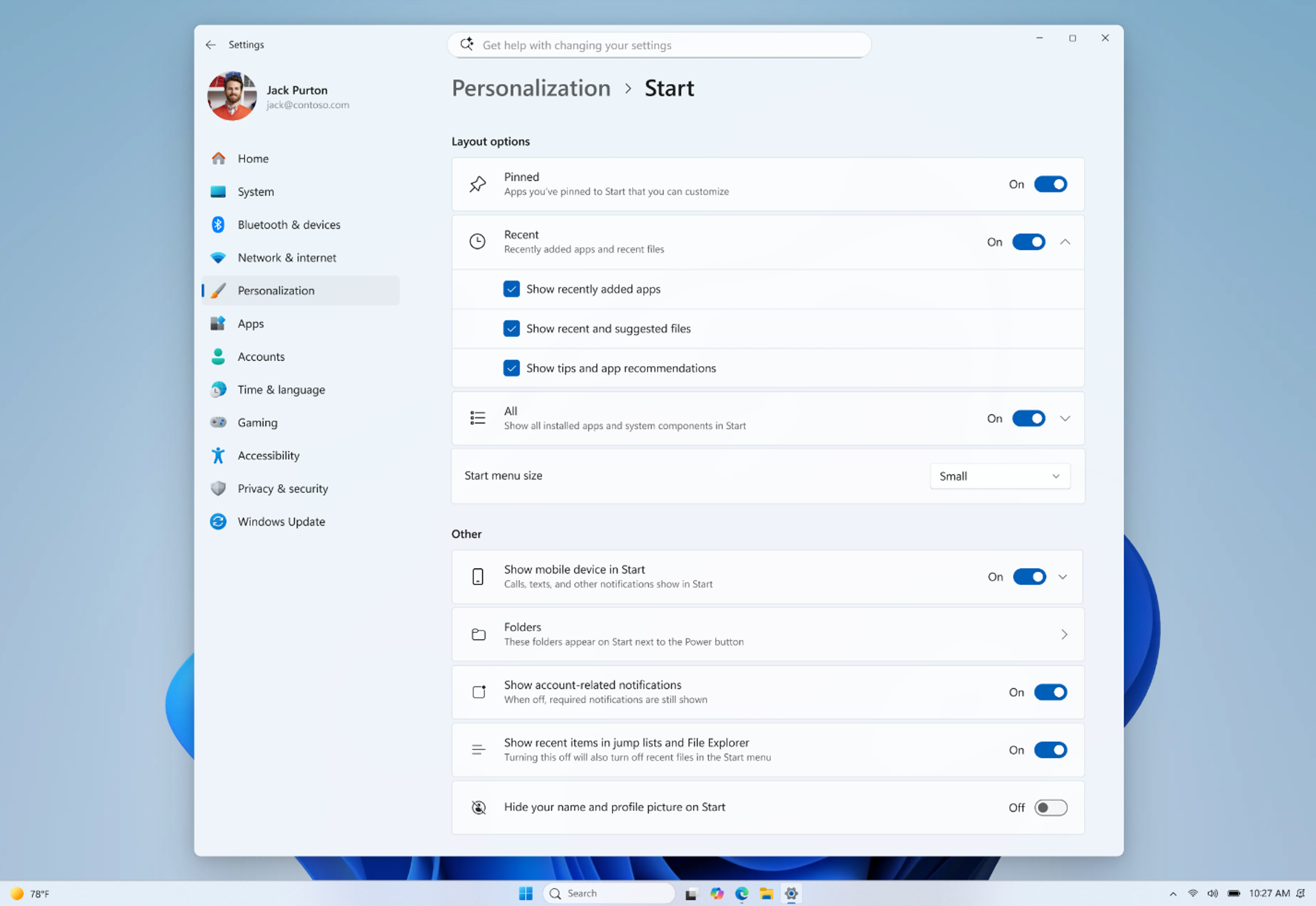
For example, Microsoft is highlighting new Start menu views and sizing options, the ability to move the taskbar to additional positions, and a smaller taskbar. If these sound familiar, it’s because we’ve already covered them in September’s update.
File Explorer gets AI actions for supported images, options to summarize OneDrive and SharePoint documents, quick actions for work and school accounts, and support for more archive formats.
Windows Search also gets improvements, including previews, better handling of typos and partial app names, clearer result types, and automatic indexing of frequently used folders. The idea is to make it easier to find something even when you don’t type its exact name.
On the accessibility side, Magnifier adds more precise zoom controls and screen tint options. Narrator gets Braille Viewer and other improvements, while Voice access expands natural language commanding on supported Copilot+ PCs.
These are useful changes, but if your PC already has them, installing 26H2 won’t make them feel new again. As I found when I tested Windows 11 26H2 ahead of release, you shouldn’t expect a completely different desktop after the restart.
Windows 11 26H2 resets the support lifecycle
So why install another Windows version if your PC already has most of the features? Well, the support window is one of the main reasons.
Microsoft confirmed that September 29, 2026 marks the start of servicing for Windows 11 26H2:
| Windows 11 26H2 edition | Support period |
|---|---|
| Home and Pro | 24 months |
| Enterprise and Education | 36 months |
Both support windows run from the release date. That’s particularly relevant if you’re still using Windows 11 24H2 Home or Pro, where support ends on October 13, 2026. The same editions of 25H2 remain supported until October 12, 2027.
There are two notable default changes for enterprises
First, Point-in-time restore is enabled by default on enterprise-managed PCs with a Windows partition of at least 200GB. It allows you to roll the system back to an earlier state when something goes wrong.
And Windows settings backup, previously called Windows Backup for Organizations, is enabled by default on eligible enterprise PCs.
This backs up your settings and Microsoft Store app list, which helps when moving to another PC. Your organization still needs separate arrangements for backing up other local files.
Microsoft says Windows 11 26H2 is also available through Windows Autopatch and the Microsoft 365 admin center.
The post Windows 11 26H2 is now rolling to everyone, how to get it right now, and is it even worth installing? appeared first on Windows Latest