
Windows 11 26H2’s public rollout could begin any day, and I wouldn’t be surprised if it rolls out during the week of September 28 or the following week (early October). But it’s not an update you should be excited about unless you care about the Windows lifecycle or you’ve been planning a fresh install (clean install), in which case 26H2 is the right time to do it.
Ahead of the rollout, Microsoft has now quietly released Windows 11 26H2’s evaluation ISOs for enterprises. Although these ISOs are not meant for consumers, they allow IT admins to try Windows 11 26H2 on their systems and find out if their apps, drivers, or tools are compatible before deploying it across the organization.
When Windows 11 ISOs for an annual update are seeded to enterprises for testing, it usually means rollout is just around the corner. Also, Windows 11 26H2 had already gone to the Release Preview Channel last month for a final round of testing. And the final milestone is now public rollout.
I’ve been tracking Windows development for over a decade, and Windows 11 26H2’s imminent rollout also lines up with Microsoft’s previous releases. For those unaware, annual feature updates usually roll out in the last week of September or early October, and it’s typically scheduled for a Tuesday:
| Windows 11 version | Public release date | Public release day |
|---|---|---|
| 21H2 (original launch) | October 5, 2021 | Tuesday (first of the month) |
| 22H2 (2022 Update) | September 20, 2022 | Tuesday (third of the month) |
| 23H2 (2023 Update) | October 31, 2023 | Tuesday (fifth of the month) |
| 24H2 (2024 Update) | October 1, 2024 | Tuesday (first of the month) |
| 25H2 (2025 Update) | September 30, 2025 | Tuesday (fifth of the month) |
| 26H2 (upcoming) | Pending as of September 28, 2026 | Pending |
| 26H1 is a hardware-specific release for new devices and is excluded from this annual-update comparison. | ||
Why is Microsoft releasing Windows 11 26H2?
Windows 11 26H2 is based on the same platform release as 24H2 and 25H2, codenamed “Germanium.” In other words, all three versions of Windows 11 share the same underlying core, so going from one to another is not a major platform upgrade. It’s also why going from 24H2 to 25H2 or even 26H2 can take a few minutes, with less risk of breaking things.
Right now, whether you use Windows 11 24H2 or 25H2, you have access to the same monthly cumulative updates and largely the same features, improvements, and fixes, but with different build numbers. The same thing is going to repeat with Windows 11 26H2.
For example, the same cumulative update can cover Windows 11 24H2 and 26H2 while both versions are supported, and Windows would look largely the same.
So why is Microsoft doing Windows 11 26H2 if all three versions LITERALLY share the same core? Well, Windows 11 25H2’s Home and Pro support ends on October 12, 2027, a little over a year from now, and support for the same editions of Windows 11 24H2 wraps up in less than a month.
Microsoft won’t keep maintaining version 25H2 beyond its lifecycle, so it’s releasing 26H2 with a new support window. That also gives you more time to prepare for its next big release, which could be 27H2.
If you don’t understand how the Windows lifecycle works, take a look at the simple table I made:
| Windows 11 version | Servicing branch | Home and Pro support ends | Enterprise and Education support ends |
|---|---|---|---|
| Windows 11 24H2 | 24H2 / Germanium | October 13, 2026 | October 12, 2027 |
| Windows 11 25H2 | 24H2 / Germanium | October 12, 2027 | October 10, 2028 |
| Windows 11 26H2 | 24H2 / Germanium | Expected around October 2028* | Expected around October 2029* |
*Windows 11 26H2 end-of-support dates are not official yet. However, Windows 11 versions are typically supported for 24 months for Home/ Pro and 36 months for Enterprise/Education. So I’ve come up with estimates in the above table.
The other option for Microsoft was to release a new platform update for Windows 11, and that would have made the Windows 11 2026 update a big release. But that would directly contradict the company’s prior promise to make Windows stable. At this stage, Microsoft cannot afford to release a new Windows version based on a new platform, as that could bring more upgrade and compatibility issues.
Windows is buggy even without a major platform change, and it could get worse with a new one
If you remember, when Windows 11 23H2 was starting to become stable, Microsoft released Windows 11 24H2, and it was a new platform release. That meant you had to spend several minutes (or even hours) installing Windows 11 24H2, sometimes dealing with driver compatibility issues too.
It went smoothly on some PCs, but some had major issues. With 25H2 and 26H2, Microsoft is taking a different approach where it can add new features to Windows without major platform releases. That reduces the risk of bugs, but still makes Windows exciting for the agentic era (I am sorry, but it is what it is).
“Updating from one version of Windows to another from the same branch greatly reduces the risk of application or hardware compatibility issues,” Microsoft explained in a document seen by Windows Latest. Here, “same branch” simply refers to versions based on the same platform release.
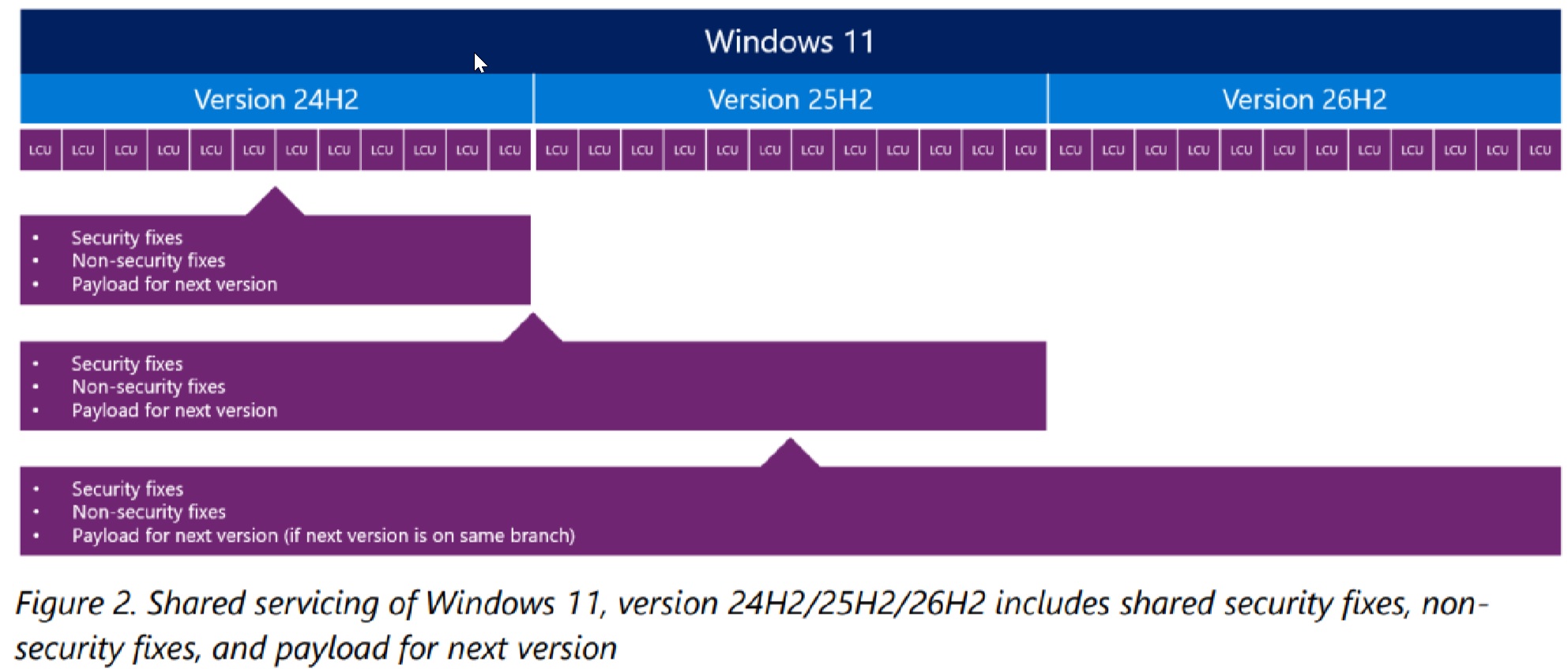
Microsoft noted that versions on the same servicing branch share “the source code,” “security and non-security fixes,” and “compatibility and regression testing done prior to release.”
And the above theory applies to Windows 11 26H2, as the company noted in a document previously seen by WindowsLatest.com:
“What does this mean for moving from Windows 11, version 25H2 to 26H2? We introduced new features without regressions or compatibility issues because 26H2 is the same source code with only the additional features turned on.”
“If an issue affects 26H2, it will also affect 25H2, and vice versa. Likewise, an update that would fix that issue is the same update for both versions. It is the same source code, the same update package to install.”
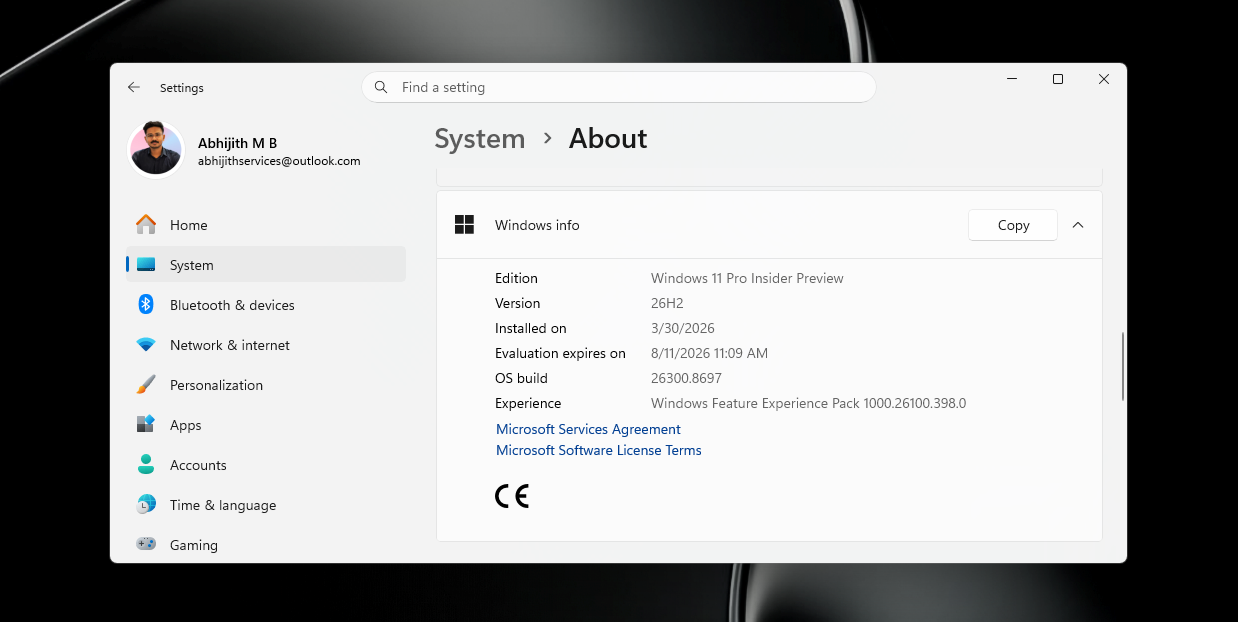
What happens if Windows 11 26H2 rolls out this week or the week after?
Windows 11 26H2 is expected to arrive on eligible PCs as an optional feature update, but it’s actually an eKB (enablement package). On up-to-date PCs running 24H2 or 25H2, this release should take just a few minutes and a single restart to finish installing.
An eKB flips the build and OS version numbers and turns on changes already delivered through updates, while the underlying platform remains the same.
There are no new features in Windows 11 2026 update (26H2), so don’t hold your breath.
The post Windows 11 26H2 releases any day now, and here’s who gets it and when appeared first on Windows Latest